Manual
The lawyer selects data on screen. Discreo keeps codes consistent across the case and restores the original details in the finished document. This mode runs on a standard computer.
Discreo flags client data on screen and replaces it with codes such as [OSOBA-A] or [PESEL-1]. The lawyer decides what to disclose. The approved copy goes to AI; original details are restored in the finished draft on the firm’s computer.
The invitation-only demo uses sample documents only. admin@sdet.it
 Enlarge
AI tools can speed up drafting. When a sentence is pasted into an external AI service, any names, addresses and identifiers in it leave the firm.
A PESEL number, a land register reference, a property address or an inflected company name can all point to someone. Professional secrecy covers the entire matter, including facts beyond personal data.
Redacting paper copies takes time and makes details easy to miss. A basic search treats different grammatical forms of a Polish surname as separate words. Once the AI draft comes back, someone still has to type the details in again. Discreo brings the whole process on screen.
Discreo suggests what to hide. The lawyer reviews the proposals and decides what to share.
Discreo runs on the firm’s computer. The source document and the case dictionary, an encrypted mapping between codes and original values, stay on that computer. Discreo makes only the approved coded copy available externally.
The source document and encrypted case dictionary stay on the firm’s computer.
Details approved for redaction are replaced with codes such as [OSOBA-A], [ADRES-1] and [PESEL-1].
The chat receives the coded copy. It gets the structure of the case without the parties’ details.
The original details are restored in the finished document on the firm’s computer.
The same code refers to the same person throughout a case. AI can follow each party’s role across documents.
The workflow is the same across the firm. More capable hardware enables more automated suggestions. In every mode, the lawyer makes the decisions.
The lawyer selects data on screen. Discreo keeps codes consistent across the case and restores the original details in the finished document. This mode runs on a standard computer.
In the “Lekki” (Light) and “Awaryjny” (Fallback) profiles, detection uses a named-entity recognition model where available and rules that validate check digits. This mode can run on a less powerful graphics card or on the CPU alone and calls for a closer manual review.
The “Pełny” (Full) profile adds Bielik, a Polish language model that can catch details missed by the earlier checks. It requires an Apple Silicon Mac with 16 GB of memory or an NVIDIA GPU with 8 GB of graphics memory.
Discreo checks the hardware and suggests the most capable mode available. A lighter detection profile prompts a closer review of the document.
Six steps: from adding a document to a finished DOCX.
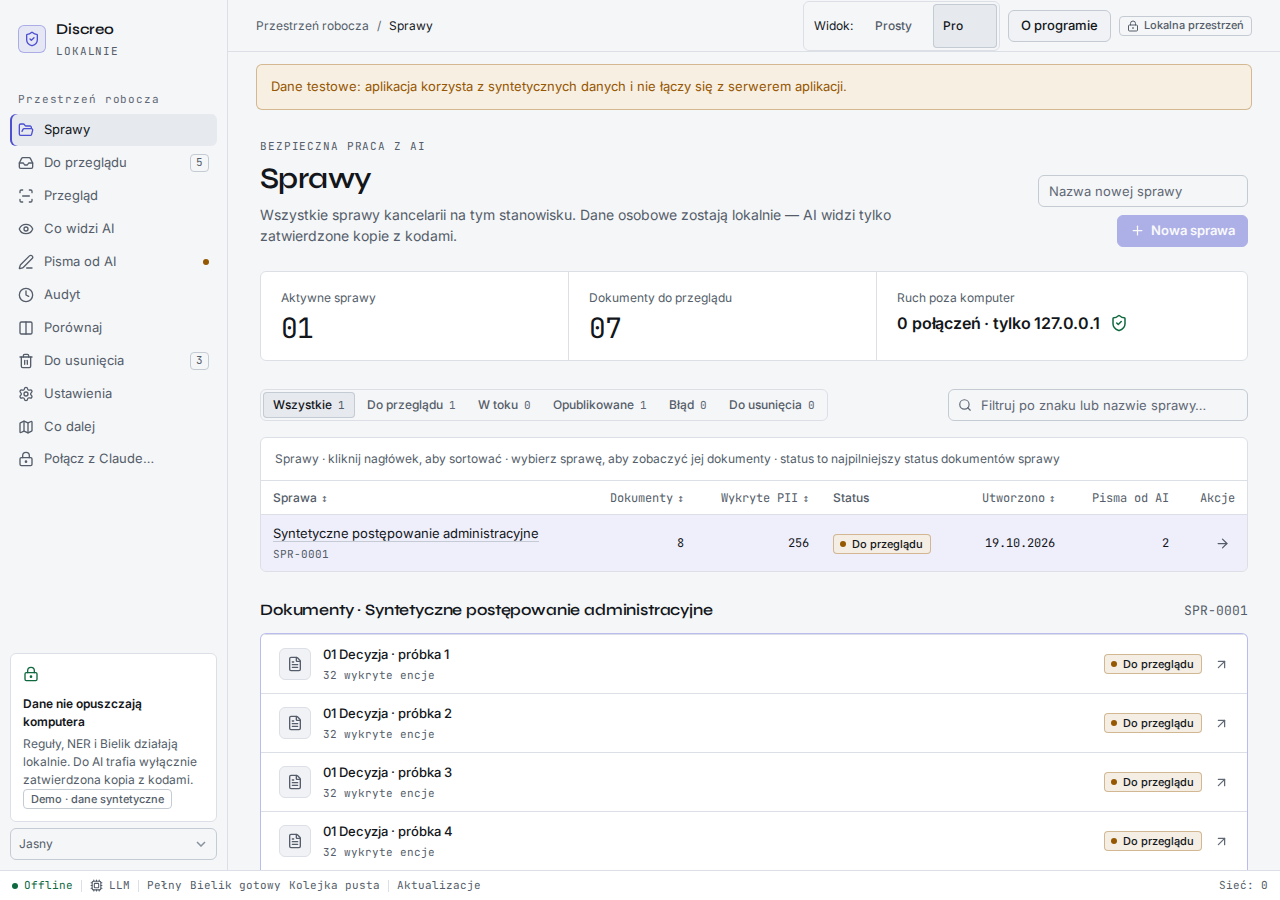
Documents are added via “Nowa sprawa” (New case) in “Moje sprawy” (My cases). Discreo accepts PDF, DOCX, DOC, TXT, XML, XAdES, and photos and scans in JPG, PNG and TIFF.
The app is in Polish. The controls are “Dodaj dokument” (Add document), “Sprawdź dane” (Review data), “Zatwierdź” (Approve) and “Przekaż do AI” (Share with AI). After the AI step, original details are restored in the Word document.
A whole folder can be uploaded. Discreo skips files it cannot accept and processes the rest.
DOC files require a local installation of LibreOffice. Text recognition for photos and scans runs locally. Scans require particularly careful review.
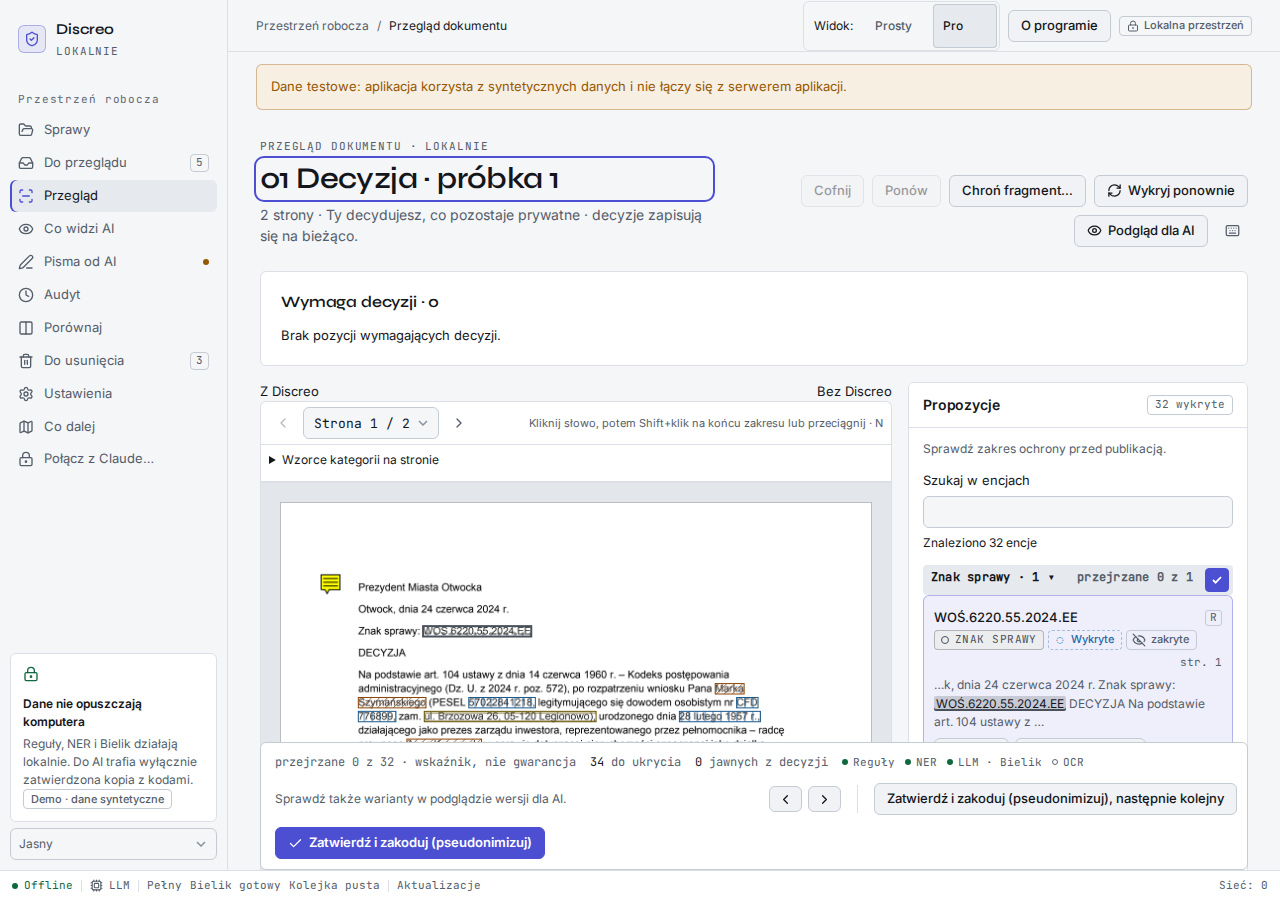
Early suggestions can be reviewed when “Program jeszcze analizuje — możesz już sprawdzać” appears (Analysis is still running. Review can start). Approval is available once analysis finishes.
In the full profile, rules first validate check digits in identifiers such as PESEL, NIP and REGON. A Polish recognition model then looks for names, companies and addresses, including inflected forms. Finally, Bielik makes another pass.
Enlarge
The model quotes the document verbatim. Discreo calculates where each quote appears in the text.
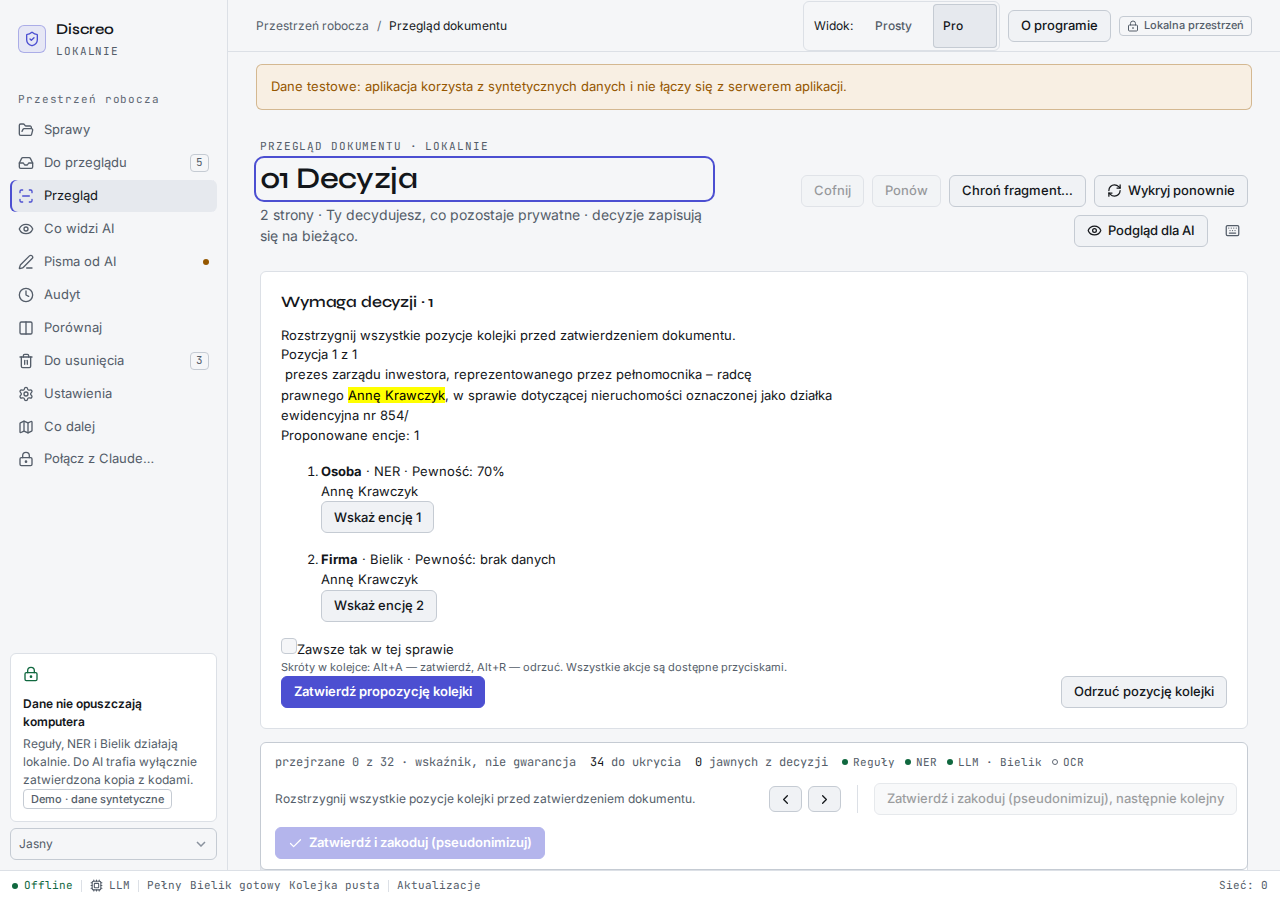
Each item is reviewed individually before the copy is approved.
Each suggestion goes into “Wymaga decyzji” (Needs a decision), with the options “Ukryj” (Hide) and “Zostaw widoczne” (Leave visible). A missed passage can be marked via “Program coś pominął — zaznacz fragment” (Something was missed. Select the passage). Decisions can be reviewed and undone in “Rozstrzygnięte” (Decided). “Zawsze tak w tej sprawie” (Always do this in this case) carries a decision over to later documents in the case.
Before the first copy in a case is shared, an operator ID must be set, responsibility acknowledged in “Zanim przekażesz kopię AI” (Before you share the copy with AI), and the firm’s data processing agreement (DPA) with the AI provider confirmed.
Discreo offers “Prosty” (Simple) and “Pro” (Pro) views, keyboard controls and a seven-step tutorial.
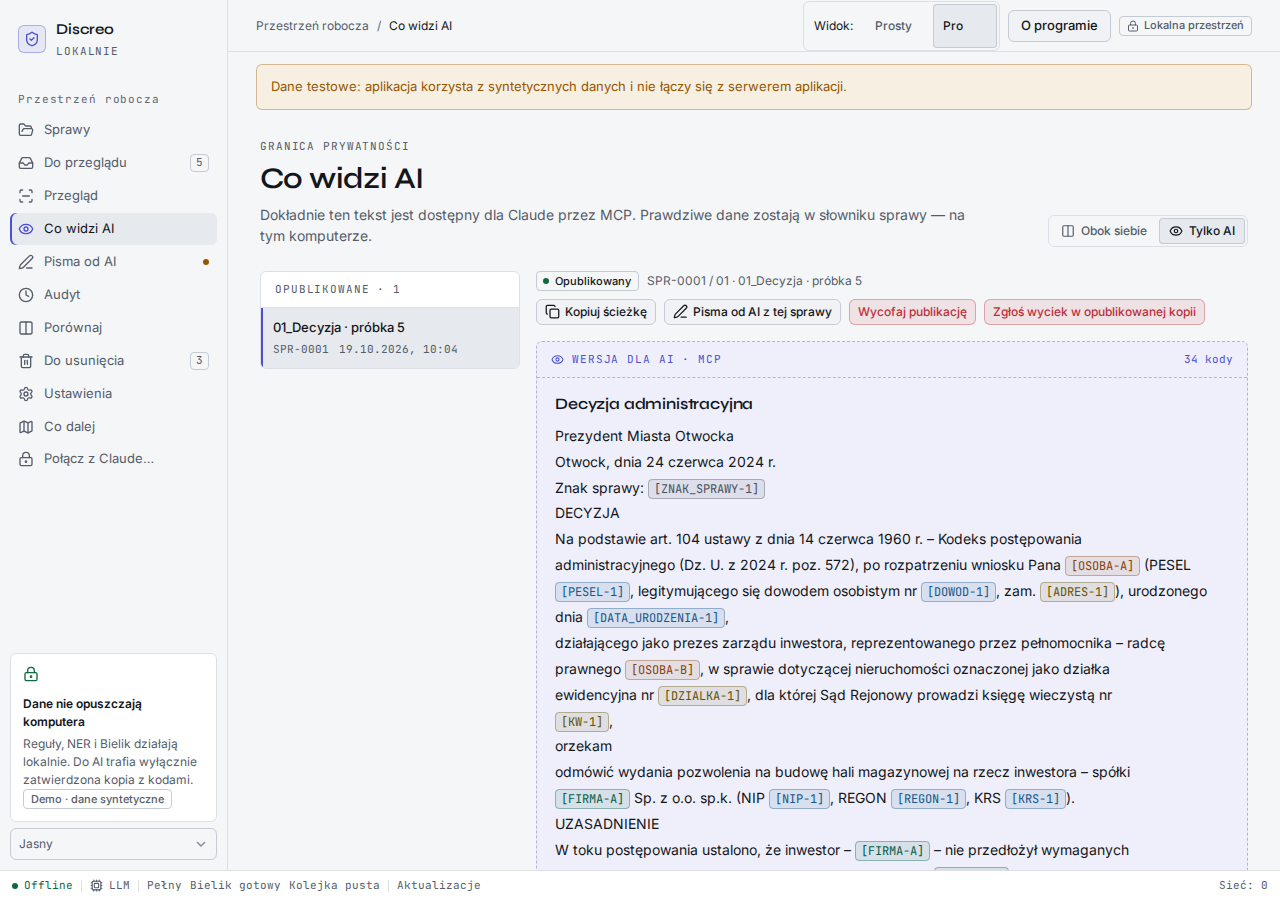
“Co widzi AI” (What AI sees) shows the coded copy. Before sharing, Discreo runs a final check.
If any value from the case dictionary remains, including values written with lookalike characters such as Cyrillic letters or split by invisible characters, Discreo blocks sharing.
“Kontrola końcowa nie znalazła żadnej prawdziwej danej w kopii.” (The final check found no original values in the copy.)
The copy excludes image metadata, DOCX file properties and XAdES signature data. Access can be revoked via “Cofnij udostępnienie” (Revoke sharing) in “Przekazane do AI” (Shared with AI). Any content the AI service has already read remains with that service.
The coded copy is shared with the chosen AI tool.
In the local version, “Połącz z Claude…” (Connect to Claude…) connects Discreo to Claude Desktop and Claude Code. The assistant can read approved coded copies and save a draft back to the case. The originals and the case dictionary stay outside its reach.
The Claude connection is available only in the local version.
Enlarge
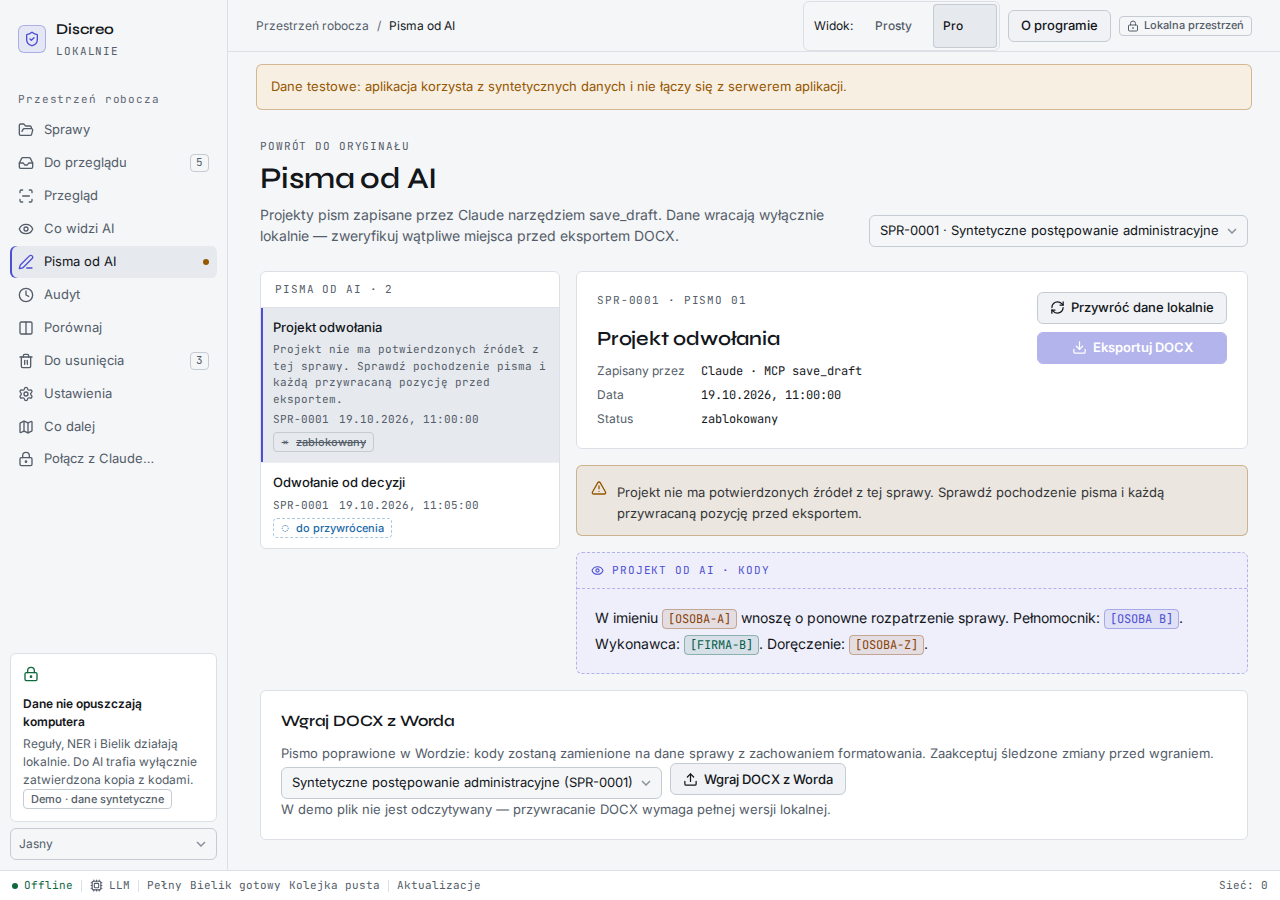
Fictional example: …counsel for [OSOBA-A] asks for the decision to be set aside in full, arguing that the property at [ADRES-1]…
“Przywróć dane lokalnie” (Restore data locally) replaces the codes using the case dictionary and preserves the document’s formatting.
The AI response is added in “Pisma od AI” (AI drafts), where “Wgraj DOCX z Worda” (Upload a Word DOCX) is also available.
Discreo recognises inflected or reformatted codes and marks them “do weryfikacji” (for review).
An unknown or damaged code blocks export until it is resolved.
The invitation-only online demo covers the workflow from document upload to data restoration in a DOCX.
Invitations are valid for up to 24 hours. A new invitation can be requested after expiry.
Only invited addresses can sign in. If the code does not arrive after a few minutes, the spam folder and the address used to sign in are worth checking. Access can be requested without an invitation.
A prefilled email opens. If the mail app does not open, a message can be sent to admin@sdet.it with the firm, role, work email address and what is to be tested.
| Online demo | Law firm version | |
|---|---|---|
| Documents | Sample documents only | The firm’s documents |
| Where it runs | On the demo server | On the firm’s computer |
| Bielik model | Hosted, accessed via API for sample data only | Local, offline |
| Claude connection (MCP) | Unavailable | Available |
| Storage | Cases are automatically deleted after 24 hours | Local, with an encrypted case dictionary |
| Access | Invitation valid for up to 24 hours and a code by email | A workstation at the firm |
The demo is for sample documents only. Real case files and client data must not be uploaded.
Discreo recognises the structure of Polish legal documents. It flags parties’ details for redaction while keeping information AI needs to work on the case visible for review.
Discreo validates check digits algorithmically. When in doubt, it suggests hiding the data. The lawyer always makes the final decision.
Data detection, including Bielik, runs offline on the firm’s computer. Model files are downloaded after consent is given or imported from disk. Discreo verifies the checksums in both cases.
Discreo encrypts the mapping between codes and original values locally using AES-256-GCM envelope encryption. The system keystore holds the key. The recovery key is a twelve-word phrase. The dictionary stays separate from the copy for AI.
Before sharing, Discreo looks for values from the case dictionary, including ones disguised with lookalike characters. Any match blocks sharing.
The copy for AI excludes image metadata (EXIF/XMP), DOCX file properties and XAdES signature data.
A hash chain protects the audit log. “Zweryfikuj łańcuch” (Verify chain) checks its integrity. The log can be exported to CSV or PDF. “Zgłoś wyciek w opublikowanej kopii” (Report a leak in a published copy) records the report in the log. The firm assesses whether a personal data breach occurred.
If analysis cannot finish, Discreo withholds the incomplete result. On less capable hardware, it suggests a lighter mode and flags the need for a closer review.
Deleting a case destroys its key, making its encrypted data unreadable. Earlier exports, backups and copies already shared with AI are outside the scope of that deletion. The case retention period can be set in settings.
Discreo checks the hardware and suggests the most capable mode available.
The pilot covers a single workstation. Installation, settings and terms are discussed with each firm. The partner and data protection officer receive information on how Discreo works and where its limits are.
Printing, marking up and scanning paper copies, and retyping original details in the finished document can be skipped. The demo makes it possible to try the workflow on sample documents and assess the time saved at a particular firm.
The firm must decide in light of its professional regulator’s rules. Discreo keeps the source document and case dictionary local and makes the approved coded copy available for sharing. The copy still contains case facts. Before sharing, the firm assesses what can be disclosed and confirms that it has a data processing agreement (DPA) with the AI provider.
Discreo performs pseudonymisation (Art. 4(5) GDPR). The case dictionary makes restoration possible, so the coded copy remains personal data for the firm. The firm’s obligations as controller continue to apply, including having a data processing agreement (DPA) where its AI provider acts as a processor.
In the law firm version, processing takes place locally. The user decides whether to send the approved coded copy to the chosen AI service. Discreo asks for confirmation of the data processing agreement (DPA) with that provider before sharing. The online demo runs on the Discreo server and is for sample documents only.
Pilot terms are agreed with each firm. A message to admin@sdet.it can include the firm’s name, the number of workstations and the types of matters handled.
Usually, other details also need review. Discreo flags identifiers, addresses, land register numbers and company names, and runs a final check before sharing. The lawyer still needs to assess whether the facts of the case can identify someone.
Each suggestion is reviewed. Missed passages can be marked manually, and “Zostaw widoczne” reveals items that should stay visible. In doubtful cases, Discreo suggests hiding the data. The final check blocks copies with values left over from the case dictionary. A careful review is still needed for anything the check cannot see.
“Przywróć dane lokalnie” restores them on the computer, including in a Word DOCX with its formatting preserved. Discreo flags changed codes “do weryfikacji” and blocks export if a code is unknown.
The coded copy is plain text and can be shared with the chosen AI tool. The local version can also connect directly to Claude Desktop and Claude Code. That connection exposes only approved coded copies to the assistant.
Discreo prepares documents for use with AI. Legal decisions stay with the lawyer, and the firm assesses its obligations for the AI service it uses. Discreo makes no claim of AI Act compliance.
PDF, DOCX, DOC with a local LibreOffice installation, TXT, XML and XAdES, plus photos and scans in JPG, PNG and TIFF. Text recognition for scans is less reliable, so scans require particularly careful review.
The manual and semi-automatic modes run on a standard computer, including one without a dedicated graphics card. Automatic mode with Bielik requires an Apple Silicon Mac with 16 GB of memory (32 GB recommended) or a PC with an NVIDIA GPU with 8 GB of graphics memory and 16 GB of RAM. The models need about 15 GB of disk space. The Windows version is in development.
The demo has limited language model capacity shared across all users. Time-limited invitations let more people try it. A new invitation can be requested after expiry.
“I have an invitation — open the demo” opens the sign-in page. It uses the work email address on the invitation and the one-time code sent to that address. Without an invitation: Request demo access. Replies come from admin@sdet.it.
Discreo is developed by the sdet.it team. Questions about the demo, a pilot or security can be sent to admin@sdet.it and are answered personally.
The demo is by invitation and uses sample documents.